After-sale
MOZA Elite Club – Loyalty Rewards & Membership Guide
Introduction
MOZA Racing’s enhanced loyalty program is designed for sim racing and flight simulation enthusiasts, delivering exclusive benefits, accelerated rewards, and personalized perks. Building on the original MOZA Points system, this tiered program provides greater value across the MOZA ecosystem.
Whether you’re a new member or a long-time supporter, this guide explains how the program works, how to earn and redeem points, and answers frequently asked questions about the club.
1. What Is MOZA Elite Club?
The MOZA Elite Club is a loyalty program that rewards users based on their engagement and spending with MOZA Racing. Members earn MOZA Points and can unlock tier-based rewards, exclusive benefits, and special offers.
Program features include:
Birthday Month Surprises – Special rewards during your birthday month.
Multi-Tier Rewards – Earn more as you climb membership levels.
Exclusive Perks – Access limited-time coupons, product testing opportunities, and promotional offers.
*Terms and tier benefits apply.
2. Membership Tiers & Benefits
Membership levels are determined by your total spending within a rolling 365-day period. Points also expire 365 days after being earned.
| Tier | Entry Spending | Maintenance | Points per $10 | Member Discount | Tier Upgrade Bonus | Entry Reward |
|---|---|---|---|---|---|---|
| Starter | $0 | $0 | 1.0 | None | 0 pts | None |
| Challenger | $500 | $50 | 1.2 | None | 50 pts | $5 OFF (Orders > $50) |
| Pro | $1,000 | $100 | 1.3 | 3% OFF (Accessories) | 100 pts | $30 OFF (Orders > $150) |
| Elite | $2,000 | $200 | 1.5 | 5% OFF (Accessories) | 200 pts | $50 OFF (Orders > $250) |
3. How to Earn Points
Account registration
Qualifying purchases
Completing tasks
Official events and promotions
Points accumulate based on eligible spending and activities.
4. How to Redeem Points
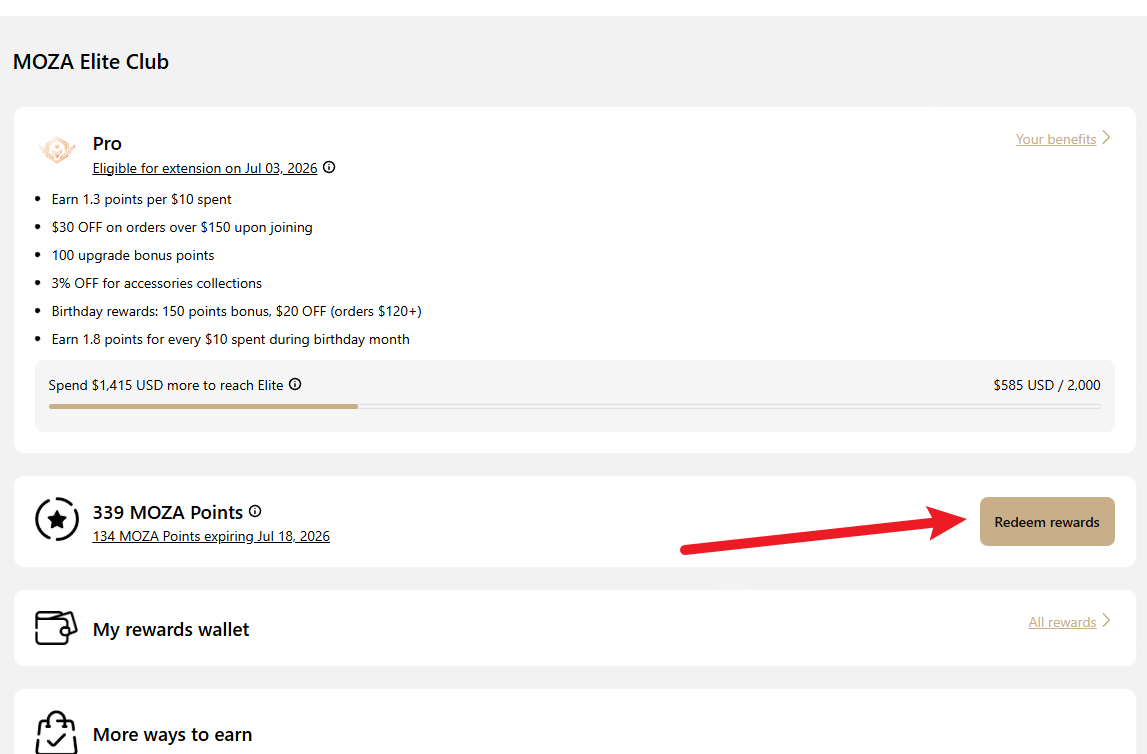
Log in to your MOZA Racing account.
Navigate to MOZA Elite Club tab in your account dashboard.
Select Redeem Rewards and choose the reward or coupon you wish to redeem.
During checkout, enter the redeemed coupon code to apply the discount to your order total.
This process ensures you can fully control which rewards to redeem and when to apply them during checkout.
Redemption rate: Every 5 points = $1 discount.
5. Frequently Asked Questions (FAQs)
What is the MOZA Elite Club?
The MOZA Elite Club is MOZA Racing’s loyalty program designed for sim racing and flight simulation enthusiasts. Members earn points, unlock tier-based benefits, and enjoy exclusive rewards across the MOZA ecosystem.
How do I join the MOZA Elite Club?
Simply create a MOZA Racing account. Enrollment is automatic and free—no additional registration is required.
What happened to my MOZA Points earned before the Elite Club launch?
All existing MOZA Points have been recalculated based on your previous purchases and aligned with the corresponding Elite Club tiers.
You can use these points for purchase discounts or enjoy tier benefits directly. Entry-tier rewards will be automatically issued to your account once you meet the requirements of a new tier.
How do I earn MOZA Points?
You can earn MOZA Points through the following activities:
- Creating a MOZA Racing account
- Making eligible purchases
- Completing tasks in the MOZA Elite Club dashboard
- Participating in official MOZA events or promotions
What currency is used for MOZA Points calculation?
MOZA Points earning and redemption rates are calculated based on the currency of the MOZA Racing site you are purchasing from:
USD – U.S. and Global site
EUR – European site
GBP – UK site
For transactions made in other currencies, the system will automatically convert the amount to the site’s local currency using the applicable exchange rate at the time of purchase.
Is there a limit to how many MOZA Points I can earn?
No. There is no limit to the number of points you can earn. The more you engage with MOZA and make purchases, the more points you accumulate.
Do MOZA Elite Club tiers and points expire?
Both membership tiers and MOZA Points expire 365 days after the date they are earned. You can view detailed expiration information in your account dashboard.
When will MOZA Points be added after I make a purchase?
Pending MOZA Points will be credited to your account 15 days after the entire order has been fulfilled (once all items in the order have been shipped). If there are refunds, returns, or order modifications during this period, the point crediting time may be extended accordingly.
When will my birthday points be added?
Birthday points are issued automatically at beginning of your birthday month.
How do I redeem my MOZA Points?
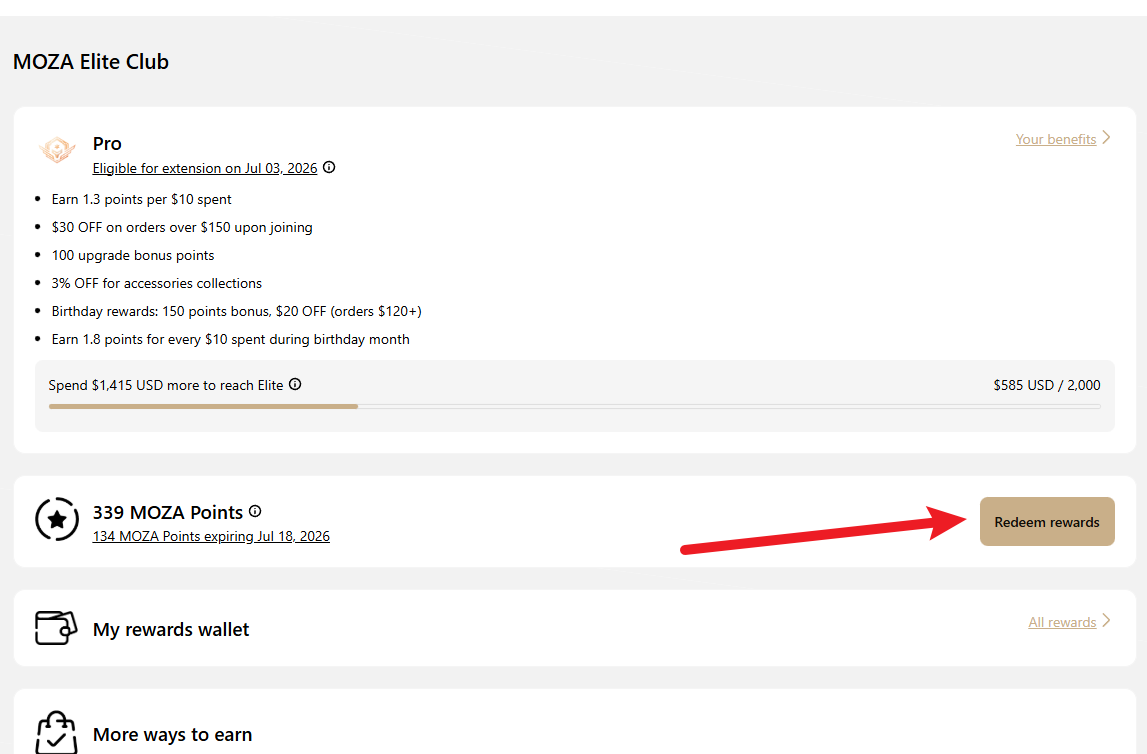
Log in to your MOZA Racing account.
Navigate to MOZA Elite Club tab in your account dashboard.
Select Redeem Rewards and choose the reward or coupon you wish to redeem.
During checkout, enter the redeemed coupon code to apply the discount to your order total.
Redemption rate: Every 5 points = $1 discount.
This process ensures you can fully control which rewards to redeem and when to apply them during checkout.
Can I use MOZA Points in combination with other promotions?
In most cases, MOZA Points redeemed coupons may be combined with other promotional discounts. Exceptions will be clearly stated in the applicable promotion terms.
Can I get my points back after redeeming them?
No. Once MOZA Points are redeemed, they cannot be refunded or restored.
Can I transfer my MOZA Elite Club Points or coupons to someone else?
No. To protect the rights of every member, all MOZA Elite Club Points and coupons are strictly account-specific and non-transferable. They can only be used by the account that earned them. Please keep your account information and coupon codes secure. Any attempt to transfer, sell, or share Points or coupons with others may result in their invalidation.
What happens to my points if I return a purchase?
If a purchased item is returned or refunded, the points earned from that purchase will be deducted from your account.
How do I check my MOZA Points balance?
Log in to your MOZA Racing account and visit MOZA Elite Club dashboard to view your current points balance and point history.
Need help? Contact MOZA Support
Was this article helpful?
That’s Great!
Thank you for your feedback
Sorry! We couldn't be helpful
Thank you for your feedback
Feedback sent
We appreciate your effort and will try to fix the article